*BSD discovery on the PINE64 ROCKPro64
3220 words, 16 minutes
I’ve been lurking on the PINE64 ROCKPro64 for a long time but its price compared to other options has always kept me from buying one. But being very happy with my ODROID HC4, I went hunting for a ROCKPro64 and found one.
I have (a small) ZFS NAS plans for it. But before I get all the hardware, let’s take a quick look at it running various BSD systems.
Hardware
Start from the beginning with reading a couple of documentation:
- ROCKPro64 product page .
- ROCKPro64 wiki page .
- Getting started with ROCKPro64 .
- How to connect the serial console
I got a board with 4 GB of RAM and no eMMC module.
The storage, for this journey, is a SanDisk Ultra 32 GB microSD card
(SDSQUA4-032G-GN6MA)
.
To manage the board, I use an adafruit USB to TTL Serial Cable for
Raspberry Pi
.
I am also using a Jack to USB-C adapter connected to a Lenovo ThinkPad
USB-C power supply (5-20 V, 3-3.25 A, 15-65 W). That allows giving
enough power to the board while being possible to use a KOWSI KWS-066C
DC 4-30V Type-C Voltage Tester to keep a look on power consumption.
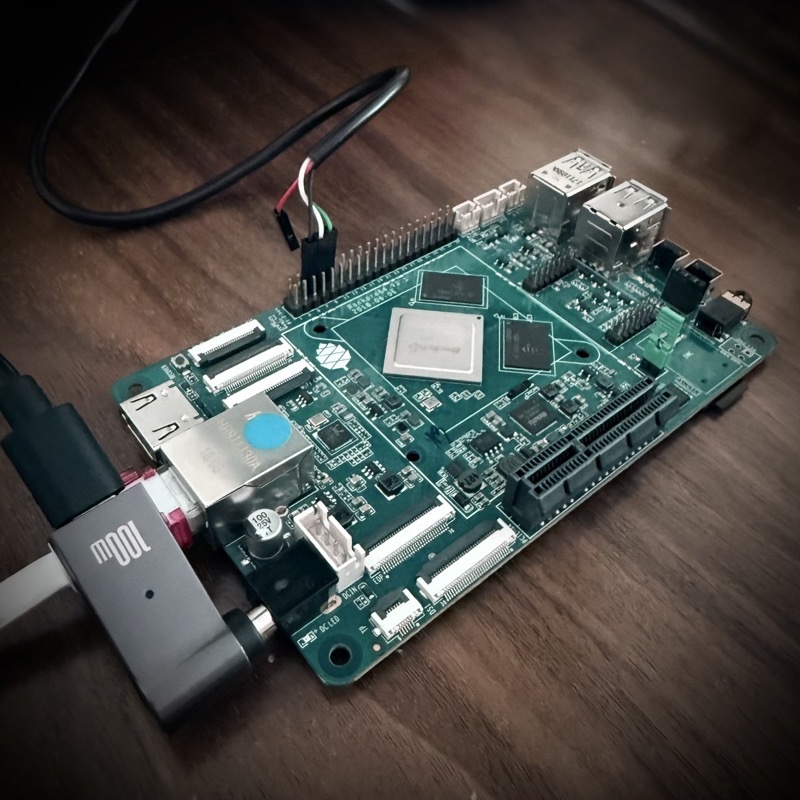
I also have both the ROCKPro64 PCI-e X4 to M.2/NGFF (SKU RPro64-M2) and ROCKPro64 PCI-e to Dual SATA-II Interface Card (RPro64-SATA). I checked both for support - given that I have a spare NVMe drive to test but not all the cablings to test SATA drives.
With this board, even with the HDMI port hooked to a monitor, nothing gets displayed. One has to use the serial console to drive the board. Given the hardware I have, the connexion cheat-sheet goes like this:
Black cable (GND) connected to PIN 6 (GND)White cable (RxD) connected to PIN 8 (TxD)Green cable (TxD) connected PIN 10 (RxD)
I am using a Slackware
Linux
laptop to connect to the console. So bare to adapt the USB serial
console device to your OS of choice. Connect the USB serial adapter to
the ROCKPro64 board and to your laptop and issue a minicom command
(double check the unusual baud rate, this is important). Then power on
the board.
# minicom -D /dev/ttyUSB0 -b 1500000
(...)
U-Boot SPL board init
U-Boot SPL 2017.09-rockchip-ayufan-1065-g95f6152134 (Apr 06 2020 - 08:10:53)
booted from SPI flash
Trying to boot from SPI
(...)
U-Boot 2017.09-rockchip-ayufan-1065-g95f6152134 (Apr 06 2020 - 08:11:15 +0000)
Model: Pine64 RockPro64
DRAM:  3.9 GiB
(...)
Without any storage or ethernet cable attached, it will loop looking for something to boot a system on.
U-Boot software update
I discovered that, the same way BIOS updates are important in the x86 world, having an up-to-date U-Boot material on the board helps OSes behave and recognize hardware in a better way.
During my first testing, the 2017.09 U-Boot version led to poor performance (on FreeBSD) and bad hardware support (PCI-e addon cards). Once the U-Boot version was upgraded, things changed.
So, flashforward, this is how to upgrade U-Boot from pkgsrc material when NetBSD is installed and running on the SD-card. This was done using the serial console to keep an eye of what happened at boot.
# pkgin in u-boot-rockpro64-2022.0
(...)
Example command to install U-Boot to an empty eMMC or SD card:
# dd if=/usr/pkg/share/u-boot/rockpro64/rksd_loader.img seek=64 of=/dev/rld0d conv=sync
Alternatively, to install to SPI flash:
dd if=/usr/pkg/share/u-boot/rockpro64/rkspi_loader.img bs=64k of=/dev/spiflash0 conv=sync

# dd if=/usr/pkg/share/u-boot/rockpro64/rkspi_loader.img bs=64k of=/dev/spiflash0 conv=sync
# sync
# shutdown -r now
The boot output revealed that the update went well.
U-Boot TPL 2022.01 (Dec 27 2025 - 19:16:53)
(...)
Trying to boot from BOOTROM
Returning to boot ROM...
U-Boot SPL 2022.01 (Dec 27 2025 - 19:16:53 +0000)
Trying to boot from SPI
U-Boot 2022.01 (Dec 27 2025 - 19:16:53 +0000)

SoC: Rockchip rk3399
Reset cause: RST
Model: Pine64 RockPro64 v2.1
DRAM:  3.9 GiB
(...)
This can probably be done using any OS that can access to proper loader and the SPI device. I’m still a newbie when it comes to U-Boot things so do your homework ;-)
NetBSD
Read the NetBSD/evbarm on Fuzhou RockChip SoCs Wiki page for overall information.
I grabbed the 10.1 ready-to-go SD image , transferred it to the SD-card, plugged the SD-card into to board and powered it on while the serial console was connected.
$ wget https://nycdn.netbsd.org/pub/arm/NetBSD-10.1-release/NetBSD-10-aarch64--rockpro64.img.gz
$ gunzip NetBSD-10-aarch64--rockpro64.img.gz
$ doas dd if=NetBSD-10-aarch64--rockpro64.img of=/dev/sdb bs=1M

$ minicom -D /dev/ttyUSB0 -b 1500000
The board booted on the SD-card and an automatic storage resizing process started. Once done, the system reboots automagically. On second boot, NetBSD starts as usual and you get granted with a login prompt.
The root user has no password (yet). Set a password, configure an
~/.ssh/authorized_keys file and you may now log in using SSH.
Leaving the board IDLE for a while kept the power consumption at 4.3 W
and CPU temperature about 54 degC (according to envstat).
As both CPU have variable frequencies, I decided to apply to lowest possible values.
# sysctl machdep | grep cpufreq
machdep.cpufreq.cpu0.target = 1416
machdep.cpufreq.cpu0.current = 1416
machdep.cpufreq.cpu0.available = 1416 1200 1008 816 600 408
machdep.cpufreq.cpu4.target = 1800
machdep.cpufreq.cpu4.current = 1800
machdep.cpufreq.cpu4.available = 1800 1608 1416 1200 1008 816 600 408

# sysctl -w machdep.cpufreq.cpu0.target=600 machdep.cpufreq.cpu4.target=600
machdep.cpufreq.cpu0.target: 1416 -> 600
machdep.cpufreq.cpu4.target: 1800 -> 600

# sysctl machdep | grep cpufreq
machdep.cpufreq.cpu0.target = 600
machdep.cpufreq.cpu0.current = 600
machdep.cpufreq.cpu0.available = 1416 1200 1008 816 600 408
machdep.cpufreq.cpu4.target = 600
machdep.cpufreq.cpu4.current = 600
machdep.cpufreq.cpu4.available = 1800 1608 1416 1200 1008 816 600 408
After a few seconds, power consumption went down to 3.5 W and CPU temperature to about 48 degC (in a 21 degC room).
Automatic CPU speed
Installing estd allows . It is done using pkgsrc and is quite
documented.
# pkg_add https://cdn.netbsd.org/pub/pkgsrc/packages/NetBSD/aarch64/10.1/All/pkgin-25.10.0.tgz
# pkgin update

# pkgin in estd

# ln /usr/pkg/share/examples/rc.d/estd /etc/rc.d/estd
# echo "estd=YES" >> /etc/rc.conf
# echo 'estd_flags="-d -a -m 408"' >> /etc/rc.conf

# service estd start
Using command like “schedctl -A 0,1,2,3 ubench -c” or “schedctl -A 4,5 ubench -c” while looking at sysctl or htop output shows how CPU
frequency vary depending on the load.
Running the bench on the Dual-core Cortex-A72 @2.0 GHz quickly raised
power consumption to 7.5 W and CPU temperature to 78 degC, raising alert
messages (rktsadc0: warning over limit on 'CPU') on the console.
Running the bench on the Quad-code Cortex-A53 @1.5 GHz seemed to limit power consumption to 4.9 W and CPU temperature to 58 degC.
estd did its job properly raising and lowering CPU speed when
required.
The NetBSD dmesg is available
here
.
USB storage and PCI-e extension cards
I connected my 8TB Portable SSD T5 EVO USB 3.2 Gen 1 to the USB ports of the board. It appeared on the USB 2.0 and USB 3.0 ports but not on the USB 3.0 Type-C port.
The ROCKPro64 PCI-e to Dual SATA-II Interface card is identified as
# dmesg
(...)
rkpcie0 at simplebus0: RK3399 PCIe
rkpcie0: waiting 874 extra ms for reset (already waited 126)
rkpcie0: MMIO (32-bit non-prefetchable): 0xfa000000+0x1e00000@0xfa000000
rkpcie0: IO: 0xfbe00000+0x100000@0xfbe00000
pci0 at rkpcie0 bus 0
pci0: i/o space, memory space enabled, rd/line, rd/mult, wr/inv ok
ppb0 at pci0 dev 0 function 0: vendor 1d87 product 0100 (rev. 0x00)
ppb0: PCI Express capability version 2 <Root Port of PCI-E Root Complex> x4 @ 2.5GT/s
pci1 at ppb0 bus 1
pci1: i/o space, memory space enabled, rd/line, wr/inv ok
ahcisata0 at pci1 dev 0 function 0: vendor 1b21 product 0612 (rev. 0x02)
ahcisata0: 64-bit DMA unavailable
ahcisata0: AHCI revision 1.20, 2 ports, 32 slots, CAP 0xeb32ffa1<SXS,CCCS,PSC,SSC,PMD,SPM,ISS=0x3=Gen3,SCLO,SAL,SSS,SSNTF,SNCQ,S64A>
ahcisata0: interrupting at irq 8192 (MSI vec 0)
atabus0 at ahcisata0 channel 0
atabus1 at ahcisata0 channel 1
(...)

# pcictl pci0 list
000:00:0: Rockchip RK3399 Root Complex (PCI bridge)
001:00:0: ASMedia ASM1061 AHCI SATA III Controller (SATA mass storage, AHCI 1.0, revision 0x02)
A spare Intel NVMe SSD hooked to the ROCKPro64 PCI-e X4 to M.2/NGFF card is identified as
# dmesg
(...)
armpmu0: interrupting on GICv3 irq 23
ld4: GPT GUID: ff3e12c9-c397-4863-8563-9a550199a5d7
armpmu1: autoconfiguration error: couldn't initialise PMU event counterdk0 at ld4: "EFI system partition", 204800 blocks at 2048, type: msdos
dk1 at ld4: "Microsoft reserved partition", 32768 blocks at 206848, type: <unknown>
dk2 at ld4: "Basic data partition", 498790065 blocks at 239616, type: ntfs
dk3 at ld4: "7c902133-9f5a-4270-b46c-69281e5b9c7d", 1085440 blocks at 499030016, type: <unknown>
(...)

# pcictl pci0 list
000:00:0: Rockchip RK3399 Root Complex (PCI bridge)
001:00:0: Intel NVMe SSD 760p/7600p/E-6100p (Flash mass storage, NVMe I/O, revision 0x03)
I briefly loaded and tested the ZFS module by creating a zpool and a couple of ZFS dataset on an USB storage. That seemed to be working properly.
OpenBSD
Read the OpenBSD 7.8 installation notes for a better overview of what happens here.
Then grab the installer and write it to an SD-card. Once done, stick the SD-card in the board and power it on.
# ftp https://cdn.openbsd.org/pub/OpenBSD/7.8/arm64/miniroot78.img
# dd if=miniroot78.img of=/dev/rsd2c bs=5m

# minicom -D /dev/ttyUSB0 -b 1500000
Note: I had issues with serial console speed using the initial 2017.09 U-Boot version I received. Everything went ok since the upgrade to 2022.01 was done.
The installation goes as usual. Unless you have specifics to specify,
just go
Once the installation is finished, simply reboot. Here also, serial console works without speed issue, thanks to the updated U-Boot.
Leaving the board IDLE for a moment had power consumption go to 3.4 W and CPU temperature to about 47 degC.
The OS sets default CPU speed to the lowest by default. But enabling
apmd allows the CPU speed to become adaptable; as seen when running
ubench -c.
# rcctl enable apmd
# rcctl set apmd flags -A
# rcctl start apmd

# while true; do
  sysctl hw.cpuspeed hw.setperf hw.sensors.rktemp0.temp0 | xargs
  sleep 1
done
During the “ubench -c” test, power consumption raised up to 7.2 W and CPU
temperature up to 70 degC, but something happens that seem to limit the
heat to 70 degC. Looking at eeprom -p output, one can see that
cpu_alert0.temperature = 70000, cpu_alert1.temperature = 75000 and
cpu_crit.temperature = 95000. The NetBSD envstat command displayed a
CritMax value of 95 and WarnMax of 75 degC. I guess OpenBSD throttles
CPU when the first heat warning is raised.
The OpenBSD dmesg is available
here
.
USB storage and PCI-e extension cards
I connected my 8TB Portable SSD T5 EVO USB 3.2 Gen 1 to the USB ports of the board. It appeared on the USB 2.0 and USB 3.0 ports but not on the USB 3.0 Type-C port.
The ROCKPro64 PCI-e X4 to M.2/NGFF card is recognized by OpenBSD, now that I have upgraded U-Boot.
# pcidump
Domain /dev/pci0:
 0:0:0: Rockchip RK3399
 1:0:0: ASMedia ASM1061 AHCI

# dmesg
(...)
rkpcie0 at mainbus0
pci0 at rkpcie0
ppb0 at pci0 dev 0 function 0 "Rockchip RK3399" rev 0x00: msi
pci1 at ppb0 bus 1
ahci0 at pci1 dev 0 function 0 "ASMedia ASM1061 AHCI" rev 0x02: msi, AHCI 1.2
scsibus0 at ahci0: 32 targets
(...)
The ROCKPro64 PCI-e to Dual SATA-II Interface Card and its attached NVMe drive is recognized by OpenBSD, now that I have upgraded U-Boot.
# pcidump
Domain /dev/pci0:
 0:0:0: Rockchip RK3399
 1:0:0: Intel NVMe

# dmesg
(...)
rkpcie0 at mainbus0
pci0 at rkpcie0
ppb0 at pci0 dev 0 function 0 "Rockchip RK3399" rev 0x00: msi
pci1 at ppb0 bus 1
nvme0 at pci1 dev 0 function 0 "Intel NVMe" rev 0x03: msix, NVMe 1.3
nvme0: INTEL SSDPEKKF256G8L, firmware L15P, serial xxxxxxxxxxxxxxxx
scsibus0 at nvme0: 2 targets, initiator 0
sd0 at scsibus0 targ 1 lun 0: <NVMe, INTEL SSDPEKKF25, L15P>
sd0: 244198MB, 512 bytes/sector, 500118192 sectors
(...)
Note on the U-Boot upgrade
It occurred that I had saved enough dmesg outputs during my journey to
have a look at some differences between the two U-Boot versions.
(...)
mainbus0 at root: Pine64 RockPro64            | mainbus0 at root: Pine64 RockPro64 v2.1
psci0 at mainbus0: PSCI 1.0, SYSTEM_SUSPEND   | psci0 at mainbus0: PSCI 1.1, SMCCC 1.2, SYSTEM_SUSPEND
efi0 at mainbus0: UEFI 2.0.5                  | efi0 at mainbus0: UEFI 2.9
                                              > efi0: Das U-Boot rev 0x20220100
                                              > smbios0 at efi0: SMBIOS 3.0
                                              > smbios0: vendor U-Boot version "2022.01" date 01/01/2022
                                              > smbios0: Unknown Unknown Product
cpu0 at mainbus0 mpidr 0: ARM Cortex-A53 r0p4   cpu0 at mainbus0 mpidr 0: ARM Cortex-A53 r0p4
(...)
                                              > "dmc" at mainbus0 not configured
                                              > "config" at mainbus0 not configured
                                              > usb4 at ohci0: USB revision 1.0
                                              > uhub4 at usb4 configuration 1 interface 0 "Generic OHCI root
                                              > usb5 at ohci1: USB revision 1.0
                                              > uhub5 at usb5 configuration 1 interface 0 "Generic OHCI root
                                              > audio0 at graphaudio0
(...)
                                              > rkvop0: using CRTC 0 for RK3399 VOPL
                                              > rkvop1: using CRTC 1 for RK3399 VOPB
                                              > drm:pid0:drm_fb_helper_find_format *WARNING* [drm] format 0x3
                                              > drm:pid0:drm_fb_helper_find_format *WARNING* [drm] format 0x3
                                              > drm:pid0:__drm_fb_helper_find_sizes *WARNING* [drm] No compat
                                              > rkdrm0: 1024x768, 32bpp
Pretty impressive. At least, now, OpenBSD supports the PCIe cards and can tell which U-Boot version I’m using.
FreeBSD
Read the FreeBSD/ARM project web page and FreeBSD arm/RockChip wiki page for more global informations.
Grab the FreeBSD ROCKPro64 image and write it onto the SD-card. Then stick the SD-card into the board, connect to the serial console and power the board up.
$ wget https://download.freebsd.org/releases/arm64/aarch64/ISO-IMAGES/14.4/FreeBSD-14.4-RELEASE-arm64-aarch64-ROCKPRO64.img.xz
$ xz -d FreeBSD-14.4-RELEASE-arm64-aarch64-ROCKPRO64.img.xz
$ dd if=FreeBSD-14.4-RELEASE-arm64-aarch64-ROCKPRO64.img of=/dev/sdb bs=5M

$ minicom -D /dev/ttyUSB0 -b 1500000
The FreeBSD-14.4-RELEASE-arm64-aarch64-ROCKPRO64.img is a complete system that will boot and grow its storage to fit the SD-card. With previous version of U-Boot, it took some time to do it. With the new version, it felt pretty normal.
One can log in using the console and the root/root credentials. SSH
is enabled and one can use the freebsd/freebsd credentials to log
in.
The system is configured with UFS. When IDLE, the board needs 3.3 W and
sysctl hw.temperature.CPU indicates 45.6 degC.
The FreeBSD dmesg is available
here
.
Trying to get ubench installed, I got errors from pkg. It turned out
to be a time issue - the board has no RTC battery.
# pkg update
The package management tool is not yet installed on your system.
Do you want to fetch and install it now? [y/N]: y
Bootstrapping pkg from pkg+https://pkg.FreeBSD.org/FreeBSD:14:aarch64/quarterly, please wait...
Certificate verification failed for /CN=pkg.freebsd.org
1050C7BF9F8F0000:error:0A000086:SSL routines:tls_post_process_server_certificate:certificate verify failed:/usr/src/crypto/openssl/ssl/statem/statem_clnt.c:1890:
Certificate verification failed for /CN=pkg.freebsd.org
(...)

# echo 'ntpd_enable="YES"' >> /etc/rc.conf
# echo 'ntpd_sync_on_start="YES"' >> /etc/rc.conf

# ntpdate fr.pool.ntp.org
ntpdate[1833]: adjust time server 172.234.184.36 offset +0.002677 sec
# service ntpd start
Starting ntpd.

# pkg update
The package management tool is not yet installed on your system.
Do you want to fetch and install it now? [y/N]: y
Bootstrapping pkg from pkg+https://pkg.FreeBSD.org/FreeBSD:14:aarch64/quarterly, please wait...
Verifying signature with trusted certificate pkg.freebsd.org.2013102301... done
Installing pkg-2.5.1...
Extracting pkg-2.5.1: 100%
Updating FreeBSD repository catalogue...
Fetching meta.conf: 100%    179 B   0.2 k/s    00:01
Fetching data: 100%   10 MiB   3.5 M/s    00:03
Processing entries: 100%
FreeBSD repository update completed. 35700 packages processed.
Updating FreeBSD-kmods repository catalogue...
Fetching meta.conf: 100%    179 B   0.2 k/s    00:01
Fetching data: 100%   18 KiB  18.7 k/s    00:01
Processing entries: 100%
FreeBSD-kmods repository update completed. 87 packages processed.
All repositories are up to date.

# pkg install ubench
Automatic CPU speed
By default, CPU will be kept at a low frequency. To enable automatic
switches, the powerd daemon has to be enabled and started.
# for n in $(seq 0 5); do sysctl dev.cpu.${n}.freq dev.cpu.${n}.freq_levels; done
dev.cpu.0.freq: 600
dev.cpu.0.freq_levels: 1416/-1 1200/-1 1008/-1 816/-1 600/-1 408/-1
dev.cpu.1.freq: 600
dev.cpu.1.freq_levels: 1416/-1 1200/-1 1008/-1 816/-1 600/-1 408/-1
dev.cpu.2.freq: 600
dev.cpu.2.freq_levels: 1416/-1 1200/-1 1008/-1 816/-1 600/-1 408/-1
dev.cpu.3.freq: 600
dev.cpu.3.freq_levels: 1416/-1 1200/-1 1008/-1 816/-1 600/-1 408/-1
dev.cpu.4.freq: 600
dev.cpu.4.freq_levels: 1800/-1 1608/-1 1416/-1 1200/-1 1008/-1 816/-1 600/-1 408/-1
dev.cpu.5.freq: 600
dev.cpu.5.freq_levels: 1800/-1 1608/-1 1416/-1 1200/-1 1008/-1 816/-1 600/-1 408/-1

# service powerd enable
# service powerd start
Running ubench -c for a moment had the board use 6.7 W, CPU frequency
raise and temperature go up to 73 degC. For reasons, both CPU seemed to
have the same 1416 max speed configured although the A72 is supposed to
be able to reach 1800. That may be due to some extra parameters I didn’t
found.
# for n in $(seq 0 5); do sysctl dev.cpu.${n}.freq; done; sysctl sysctl hw.temperature; printf '\n\n'
dev.cpu.0.freq: 1416
dev.cpu.1.freq: 1416
dev.cpu.2.freq: 1416
dev.cpu.3.freq: 1416
dev.cpu.4.freq: 1416
dev.cpu.5.freq: 1416
hw.temperature.CPU: 72.6C
hw.temperature.GPU: 66.1C
After stopping ubench, temperature went down to 48 degC and CPU
frequency to 408 - which is lower than the default 600 (w/o powerd).
The board was using 3.2 W at that moment.
USB storage and PCI-e extension cards
I connected my 8TB Portable SSD T5 EVO USB 3.2 Gen 1 to the USB ports of the board. It appeared on the USB 2.0 and USB 3.0 ports but not on the USB 3.0 Type-C port.
The ROCKPro64 PCI-e to Dual SATA-II Interface card is identified as
# dmesg
(...)
pcib0: <Rockchip PCIe controller> mem 0xf8000000-0xf9ffffff,0xfd000000-0xfdffffff irq 6,7,8 on ofwbus0
pcib0: Gen1 link training timeouted: 0x00080001.
pci0: <OFW PCI bus> on pcib0
pcib0: route pin 1 for device 0.0 to 84
ahci0: <ASMedia ASM1062 AHCI SATA controller> irq 84 at device 0.0 on pci1
ahci0: AHCI v1.20 with 2 6Gbps ports, Port Multiplier supported
ahci0: quirks=0xc00000<NOCCS,NOAUX>
ahcich0: <AHCI channel> at channel 0 on ahci0
ahcich1: <AHCI channel> at channel 1 on ahci0

# pciconf -l
pcib1@pci0:0:0:0:       class=0x060400 rev=0x00 hdr=0x01 vendor=0x1d87 device=0x0100 subvendor=0x0000 subdevice=0x0000
ahci0@pci0:1:0:0:       class=0x010601 rev=0x02 hdr=0x00 vendor=0x1b21 device=0x0612 subvendor=0x1b21 subdevice=0x1060
A spare Intel NVMe SSD hooked to the ROCKPro64 PCI-e X4 to M.2/NGFF card is identified as
# dmesg
(...)
pcib0: <Rockchip PCIe controller> mem 0xf8000000-0xf9ffffff,0xfd000000-0xfdffffff irq 6,7,8 on ofwbus0
pcib0: Gen1 link training timeouted: 0x00080001.
pci0: <OFW PCI bus> on pcib0
pcib1: <PCI-PCI bridge> at device 0.0 on pci0
pcib1: failed to allocate initial memory window: 0-0xfffff
pci1: <PCI bus> on pcib1
nvme0: <Generic NVMe Device> at device 0.0 on pci1

# pciconf -l
pcib1@pci0:0:0:0:       class=0x060400 rev=0x00 hdr=0x01 vendor=0x1d87 device=0x0100 subvendor=0x0000 subdevice=0x0000
nvme0@pci0:1:0:0:       class=0x010802 rev=0x03 hdr=0x00 vendor=0x8086 device=0xf1a6 subvendor=0x8086 subdevice=0x390b
A ZFS pool was created using a USB stick and two ZFS datasets were created. A couple of file transfers were done and everything seemed to work as expected.
TL;DR
All the three BSD systems I tried did work pretty well the same way. Support for hardware I expect to use is there. And CPU speed automatic management should ensure low power consumption.
dmesg output are available online:
- The NetBSD
dmesgis here . - The OpenBSD
dmesgis here . - The FreeBSD
dmesgis here .
That board requires using an unusual baud rate of 1500000 when connecting to the serial console. But all OSes support that.
U-Boot should definitively be upgraded when possible to ensure proper hardware support for OSes.
Overall observed temperature and power consumption are pretty close. OpenBSD seem to be more conservative when it comes to keep temperatures under the warning level. FreeBSD may not be able to reach the highest speed of Cortex-A72.
| IDLE temp | IDLE power | ubench temp | ubench power | ubench freq | |
|---|---|---|---|---|---|
| NetBSD | 48 degC | 3.5 W | 78 degC | 7.5 W | 1800 MHz |
| OpenBSD | 47 degC | 3.4 W | 70 degC | 7.2 W | 1800 MHz |
| FreeBSD | 46 degC | 3.2 W | 73 degC | 6.7 W | 1416 MHz |
Choosing a BSD system for this board seem to only be a matter of SysAdmin preferences and OS features.
In any case, don’t forget to just #RunBSD ;-)