dhcpd and unbound in FreeBSD jails
1174 words, 6 minutes
The other day, I used FreeBSD on a Raspberry Pi card to get a redundant DHCP server and DNS resolver working together with an OpenBSD server.
It works great. But another FreeBSD server is available and I don’t really need yet another gadget powered on. So I moved both the DHCP and DNS services to this machine. While I was there, I took the opportunity to put them into their own jails. Because, you know, privilege escalation…
As usual, read the FreeBSD handbook and the relevant manual page before anything else.
FreeBSD host configuration
Network specifics
I used to configure IP on the physical network interface and use it in my jails. It works ok when jails inherit the host’s IP. But trouble rises when your jail need their own IP. To solve this, I switched to using a bridge.
# vi /etc/rc.conf
(...)
ifconfig_dwc0="up"
cloned_interfaces="bridge0"
ifconfig_bridge0_name="vnet0"
ifconfig_vnet0="inet 192.0.2.5/24 addm dwc0 up"
defaultrouter="192.0.2.1"
(...)
Common jails configuration
My main configuration file sets default and common values. And include per-jail configuration files.
# cat /etc/jail.conf
path = "/jails/${name}";

exec.clean;
exec.start     += "/bin/sh /etc/rc";
exec.stop       = "/bin/sh /etc/rc.shutdown jail";
exec.consolelog = "/var/log/jail_${name}_console.log";

allow.raw_sockets;      # allow ping
mount.devfs;            # mount devfs

.include "/etc/jail.conf.d/*.conf";
The dhcpd jail
The jail setup has two main steps:
- creating a “simple multi-processes” jail with packages installed.
- modifying the jail to only run the
dhcpdservice.
The jail lies in its own ZFS dataset. And the initial jail configuration is fairly simple:
# zfs create ssdpool/jails/dhcpd

# cat /etc/jail.conf.d/dhcpd.conf
dhcpd {
  host.hostname = "${name}";
  ip4 = inherit;
  ip6 = inherit;
  devfs_ruleset = "8067";
  persist;
}
Because the dhcpd service needs access to /dev/bpf devices, a
specific devfs ruleset is created.
# cat /etc/devfs.rules
[devfsrules_desktop_jail=8067]
add include $devfsrules_hide_all
add include $devfsrules_unhide_basic
add include $devfsrules_unhide_login
add path 'bpf*' unhide

# service devfs restart
There are several ways to deploy a FreeBSD jail. I like the bsdinstall
one.
# bsdinstall jail /jails/dhcpd
The jail can then be started and configured. I like to have to bare minimum running in the jails. So I tuned it a bit before switching to the “single process running” mode.
# service jail start dhcpd

# service -j dhcpd syslogd stop
# sysrc   -j dhcpd syslogd_enable="NO"

# service -j dhcpd cron stop
# sysrc   -j dhcpd cron_enable="NO"

# jexec -l dhcpd ln -s /usr/share/zoneinfo/Europe/Paris /etc/localtime
The OpenBSD dhcpd service is available in the ports as a binary
package. I want it to run and being able to process synchronisation
messages; thanks to the -y and -Y flags, it can communicate with the
OpenBSD dhcpd service so that every clients always get proper leases.
Once the dhcpd configuration file is created, the service can be
started.
# pkg -j dhcpd install dhcpd

# sysrc -j dhcpd dhcpd_enable="YES"
# sysrc -j dhcpd dhcpd_flags="-y vnet0 -Y vnet0"

# vi /jails/dhcpd/usr/local/etc/dhcpd.conf

# vi /jails/dhcpd/etc/services
(...)
dhcpd-sync 8067/udp # dhcpd(8) synchronisation
(...)

# service -j dhcpd dhcpd start
A few moments later, having checked that everything works as expected, I
switched to the “single process mode”; the jail only starts dhcpd; and
is terminated when the service ends.
# service jail stop dhcpd

# cat /etc/jail.conf.d/dhcpd.conf
dhcpd {
  host.hostname = "${name}";
  ip4 = inherit;
  ip6 = inherit;

  devfs_ruleset = "8067";

  exec.start = '/bin/sh /usr/local/etc/rc.d/dhcpd start';
  exec.stop  = '/bin/sh /usr/local/etc/rc.d/dhcpd stop';
}

# service jail start dhcpd
It’s been working for a couple of days now without issues. And the logs highlights leases are being managed properly.
The unbound jail
Given that I’m using the provided local_unbound daemon, the jail setup
is even more straight forward:
# zfs create ssdpool/jails/unbound

# cat /etc/jail.conf.d/unbound.conf
unbound {
        host.hostname = "${name}";
        ip4 = inherit;
        ip6 = inherit;

        exec.start = '/bin/sh /etc/rc.d/local_unbound start';
        exec.stop  = '/bin/sh /etc/rc.d/local_unbound stop';
}

# bsdinstall jail /jails/unbound

# echo 'local_unbound_enable="YES"' >> /jails/unbound/etc/rc.conf

# service jail start unbound
In the previous
post
,
I pointed out that there were two available unbound options: the
system local_unbound and the unbound port. After testing and reading
a few, I went to the conclusion that I have no gain in using the
unbound port. So I went using local_unbound and twist its usage and
configuration a bit. Don’t do this at home if you’re not ready for the
consequences. And don’t complain if it burns your home lab ;-)
In this current state, unbound_local only replies to localhost
queries. Which is of no use for a LAN DNS resolver. It needs to have its
configuration modified the same way you do with regular unbound
instance. Read Unbound by NLnet
Labs
documentation for
more information.
Mine is listening on the jails interface (which is also the FreeBSD host’s interface) and allows queries from my whole LAN. It also enables a couple of “hide” and “log” directives, performs DNSSEC validation and authoritatively serve local DNS zones. It also allows DNS over TLS and forwards every requests to my public DNS resolvers.
Using TLS with local_unbound requires CA certificates. I use the
tls-cert-bundle: "/etc/ssl/cert.pem" directive which requires
maintaining that cert.pem. For some reasons, it doesn’t seem to be
maintained as part of the FreeBSD OS. You need to install some extra
package to benefit from it.
# pkg -j unbound install ca_root_nss
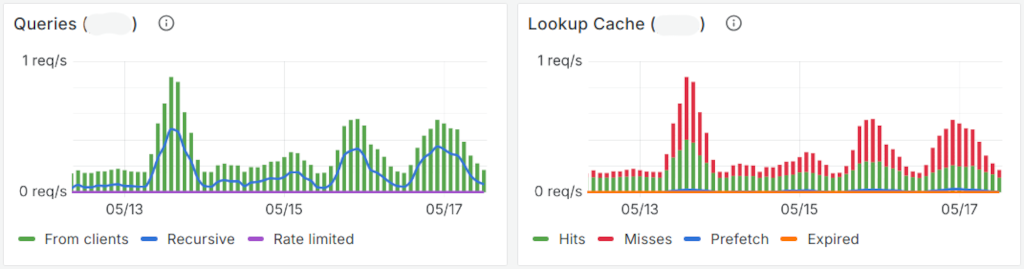
According to the monitoring process, unbound gets queries and replies to
them.
One more thing ©
Having dhcpd and local_unbound in FreeBSD jails doesn’t change the way it
complements the services that already run on another OpenBSD host. The
dhcpd daemons can talk to each other and deliver leases in partnership.
The local DNS zones files can be used from both instances and change
management is all about copying a file to the other server.
You may have noticed that I disabled syslogd and cron from both
jails. This is because I’d rather have a single syslog repository and
cron management center; on the host itself.
Scheduled tasks are configured in the host’s crontab. For example, I update the root trust anchor for DNS validation using:
# crontab -l
(...)
30 3 * * * -n /usr/sbin/jexec -u unbound unbound /usr/sbin/local-unbound-anchor -v
Collecting logs can be achieved by configuring the host’s syslogd as a
central log server. But that means listening on a network interface and
having a syslogd running in every jails to send the logs. I liked the
“additional socket” better. Quoting the manual page:
-p log_socket
Specify the pathname of an alternate log socket to be used instead; the default is /var/run/log. When a single -p option is specified, the default pathname is replaced with the specified one. When two or more -p options are specified, the remaining pathnames are treated as additional log sockets.
To access the services logs, I modified the host’s syslogd
configuration as such:
# cat /etc/rc.conf
(...)
syslogd_flags="-cc -ss -p /var/run/log -p /jails/unbound/var/run/log -p /jails/dhcpd/var/run/log"
This is probably not that much of a good idea if you have to deal with 10 000 jails. But it works ok for my use case.
Things have to be configured in syslogd.conf if you want a dedicated
log file per services. But that’s another story…