M715q power usage and the BSDes
995 words, 5 minutes
Following previous post where using M720q as a desktop machine was considered not that good, someone on the Fediverse pointed me to the AMD versions of ThinkCentre. Having noticed that ATI/AMD/Radeon GPU do seem to work pretty well on OpenBSD, I got a refurbished ThinkCentre M715q and had a look at it.
The refurbed ThinkCentre came with an AMD PRO A10-9700E R7 CPU, 4 GB of RAM and a 500 GB Western Digital Black Mobile 2.5" SATA drive.
Linux Debian 13
In IDLE mode after a standard “server” installation, power consumption was 11-12 W.
Once the DP monitor and USB keyboard are unpluggued, the power
consumption lowers to 7 W.
The usage of powertop didn’t seem to allow usage of less power.
FreeBSD 15.1
After the installation, a reboot and an IDLE time of a few minutes, the power consumption was about 22 W.
Once the DP monitor and the USB keyboard were unpluggued, the power usage
went down to 18 W.
The sysctl hw.acpi.cpu.cx_lowest=Cmax magic spell or the powerd
daemon didn’t change anything. But loading amdgpu had power usage
dropped to 10 W. Loading amdtemp didn’t change anything regarding
power usage but I could then watch the temperature being kept around 38
degC while doing nothing.
Running ubench used about 30 W but the CPU never went above 53 degC.
Strangely the process died before finishing and CPU usage was mostly
around 30%. Not sure if this means something about CPU support.
Online FreeBSD dmesg is available
here
.
NetBSD 11.0
Once the installation is finished and the system has rebooted, leaving it IDLE for a couple of minutes lead to a power consumption of 26 W.
Disconnecting the DP monitor and the USB keyboard saved a few watts but
the system was still using about 24 W. After installing and running
estd -b, power usage went down to 19 W and the temperature to 49.3
degC.
While running ubench, power usage went up to 50 W and temperature up
to 66 degC.
On this machine too, NetBSD refused to boot, or at least never issued the DHCP request, when no monitor were plugged in. The closest to headless I could get was using an HDMI Dummy plug.
Online NetBSD dmesg is available
here
.
OpenBSD 7.9
After the installation’s completed, all patches were applied and the kernel finished relinking, power consumption stabilized around 15 W.
Once apmd was started in automatic performance adjustment mode, power
usage went down to 14 W, hw.setperf being switched to 0 and
hw.cpuspeed to 800 instead of 3000.
After disconnecting the DP monitor and the USB keyboard, only 10 W were drawn from the wall.
While running ubench, power consumption did not get above 37 W.
Unless I messed up somewhere, temperatures didn’t seem to be available
in sysctl.
Online OpenBSD dmesg is available
here
.
Trying to use OpenBSD 7.9 as a workstation on this machine was not that great. It was connected to a 27" 4K monitor using a DP to HDMI dongle, a USB mouse and keyboard and a USB soundbar.
- running
vblank_mode=0 glxgearsdisplayed about 2600 FPS,topshowed 100% CPU usage (half from X11, half from GLXgears) andradeontopshowed GPU was heavily used. - displaying my favourite “Japan 4K” video via YouTube using Firefox, 1080p resolution went ok and 4K resolution badly lagged.
- displaying Big Buck Bunny in 1080p 30 FPS, using
mpv, was ok. But trying 2160p at 30 FPS had way too many frame drops.VLCdid better at the 1080p regaring CPU usage (like only 20% at the lowest speed) but displaying the 2160p video froze the system. Looking at the disk LED activity, the fan blowing like crazy, and the smart plug jumping to 60 W, something was happening. But I couldn’t even log in using SSH to have a look at it. - the internal speaker worked but I needed to use
doasto access it. Which is weird as I’m pretty sure I usually don’t have to. - suspending using
zzzand hitting the power button to resume worked as one would expect.
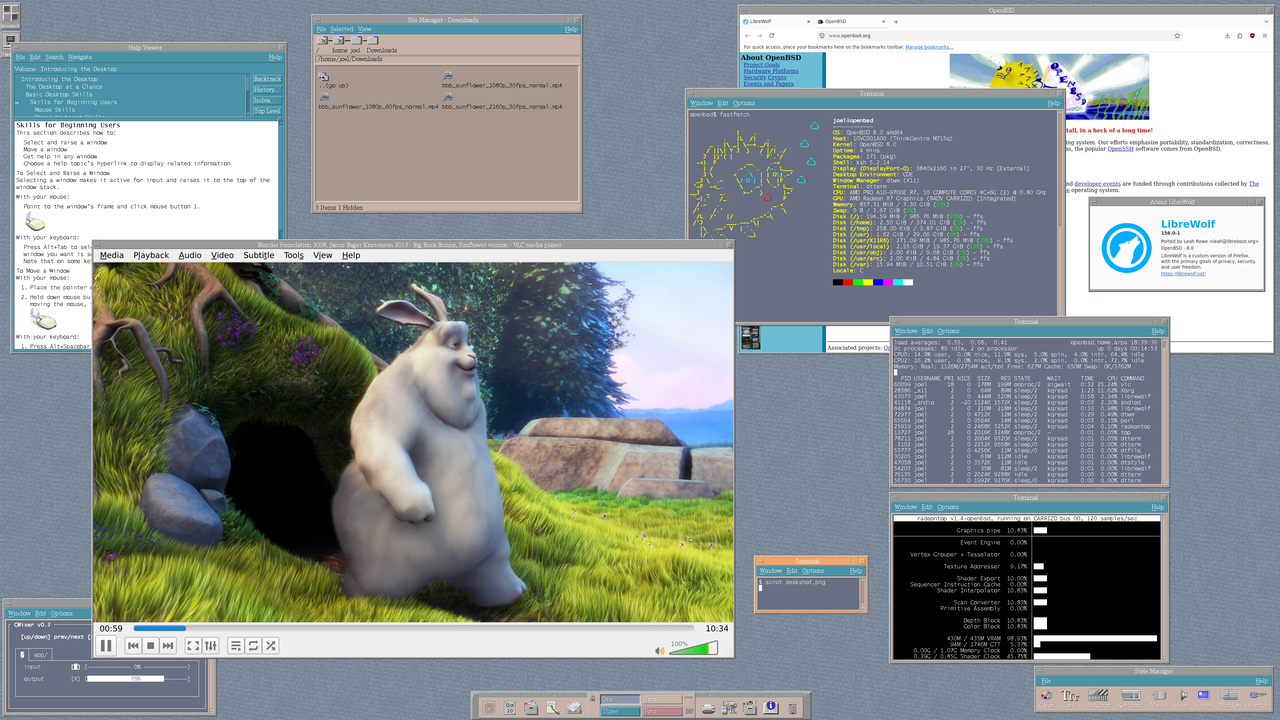
Once this test was done, I gave it a try to -snapshot. The audio access is
solved there and I can use sndioctl as expected. 2160p is still not
useable but at least, it doesn’t freeze the machine anymore. Actually,
using VLC
to display 4K content is pretty normal - only a few visual quack from
time to time. 8.0-current dmesg is available
here
and it feels
definitively like the way to go for a workstation. Finally switching to
CDE and using Librewolf turned to be way better than with 7.9. So you
definitively want to go 8.0 or 8.0-current with this machine. Note that
the fan is not inaudible though, which makes it more suitable as a
server (in a remote cupboard :) than as a workstation, close to my ears.
Conclusion
| System | Model | Base | Headless | Optimized | ubench |
|---|---|---|---|---|---|
| Windows | M710q | - | 6 W | - | - |
| M715q | - | - | - | - | |
| M720q | - | 4 W | - | - | |
| YunoHost | M710q | 11 W | 7 W | 5 W | - |
| M720q | 10 W | 6 W | 4 W | - | |
| Debian | M715q | 11 W | 7 W | 7 W | - |
| FreeBSD | M710q | 11 W | 7 W | 6 W | |
| M715q | 22 W | 18 W | 10 W | 30 W | |
| M720q | 12 W | 6 W | 6 W | 20 W | |
| NetBSD | M710q | 11 W | 8 W | 8 W | 17 W |
| M715q | 26 W | 24 W | 19 W | 50 W | |
| M720q | 12 W | 8 W | 8 W | 20 W | |
| OpenBSD | M710q | 13 W | 9 W | 9 W | 18 W |
| M715q | 15 W | 10 W | 10 W | 37 W | |
| M720q | 13 W | 9 W | 9 W | 20 W |
This AMD generation really seem to use more power than the Intel one. Also, the fan is definitively louder on the AMD model. And given that even the Intel(R) Core(TM) i5-8500T does not use more power, I would definitively go for the M720q for my homelab stuff.
But that’s just me!