OpenBSD 7.8 on Raspberry Pi Zero 2W
477 words, 3 minutes
A few years ago, I ran OpenBSD 7.4 on a Raspberry Pi Zero 2W . It was working quite nice as a DHCP and DNS server. But it froze too often for my linkings and I stopped using it.
These days, that particular board is still not referenced on the official OpenBSD arm64 supported hardware list. Still, I gave it a try on OpenBSD 7.8.
The hardware
The board I own is a Raspberry Pi Zero 2 W .
I don’t have the official power brick. And the wireless card doesn’t seem that stable. Not sure if this is related. I does work, attach to some SSID and gain network access. But after some time, the board looses network connectivity.
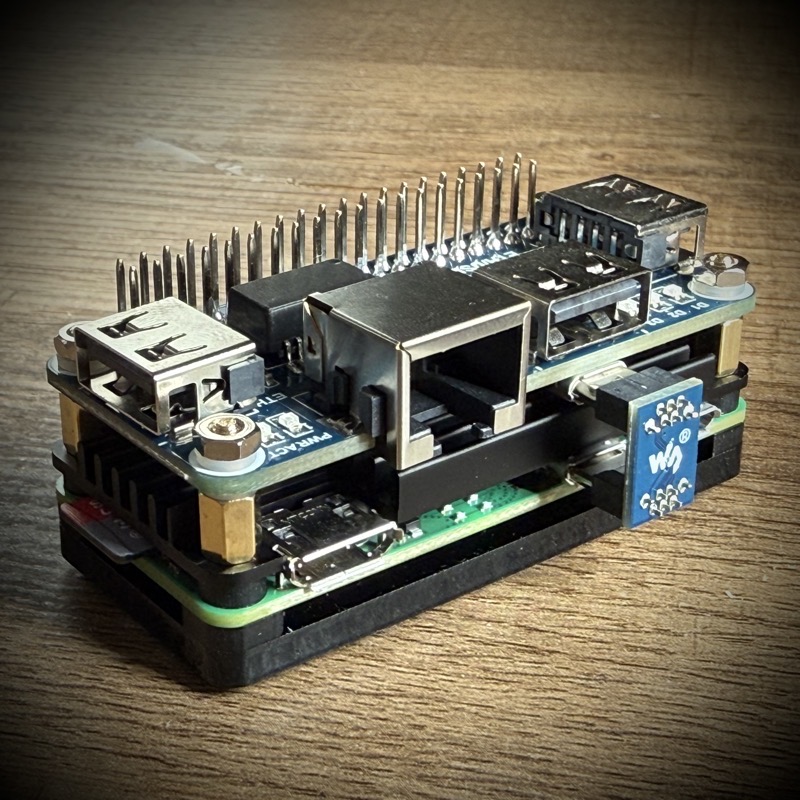
I first bought a WaveShare POE HAT but it doesn’t seem that stable either. Although it works pretty well with Linux. On OpenBSD, I got DWC2 errors that I couldn’t solve. So I got another set of hardware:
- WaveShare ETH/USB HUB HAT .
- DSLRKIT Active PoE Splitter Power Over Ethernet 48V to 5V 2.4A MicroUSB plug.
- eleUniverse 2W02 Aluminium Case Passive Cooling Pi 2W.
- SanDisk Ultra microSDHC (Sandisk, SK32G, 0085) 32GB.
With a bunch of extra screws and stuff, it assembled quite well.
Tweaking the OpenBSD installer
The OpenBSD installer expects using the serial console. But I have no
such thing on the Pi Zero 2W and want to use the mini HDMI output.
Luckily, it is as simple as writing a boot.conf file on the micro
SD-card when the official installer is written.
# fetch https://cdn.openbsd.org/pub/OpenBSD/7.8/arm64/miniroot78.img

# doas dd if=miniroot78.img of=/dev/rsd2c bs=1M

# doas mount /dev/sd2a /mnt
# doas mkdir /mnt/etc
# doas sh -c 'echo "set tty fb0" > /mnt/etc/boot.conf'
# doas umount /mnt
From there, plug the micro SD-card into the Pi slot and power it on.
Installing OpenBSD
Everything goes as usual with the installer. Although you booted from
the SD-card, it is possible to select it as the installation target -
defined as sd0. Proceed like any other OpenBSD installation.
Once the installation is finished, select the “Exit to (S)hell” option
to be able to configure the HDMI output for next boot.
# echo "set tty fb0" > /mnt/etc/boot.conf
Now simply reboot.
Running OpenBSD
I was able to compile a Go program for about 3 hours without issues.
Then came the time to run yarn commands and I faced a JavaScript heap out of memory…
Running speedtest-cli showed it is capable of using the 100Mbps
available on the hat. The wireless card is able to connect to a
WPA-Personal network although latency seem to vary quite a lot.
Whether I used the USB/ETH hat or not, the system seem to halt after some time idling. According to a message on the HDMI output, something bad happens about DWC2.
Anyway, long story short: this board is not yet Production ready.
To be continued…