What about ThinkCentre M710q, M720q and *BSD
1415 words, 7 minutes
Thanks to being subscribed to self-hosting and homelab feeds, I yet again was trapped by compulsive buying and collector’s impulse while browsing the local refurb marketplaces. This may end now. Until then, here’s a quick look at ThinkCentre M710q and M720q on various BSD systems.
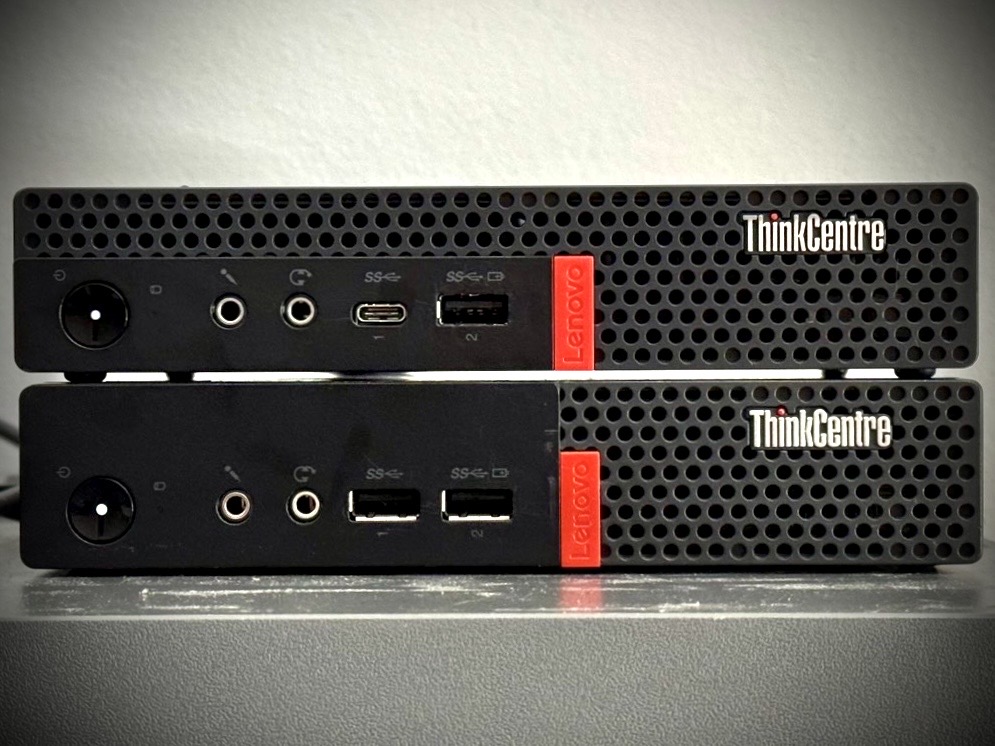
The M710q came with Windows 10, an Intel Celeron G3930T CPU, a single 8 GB module of RAM and a mechanical SATA drive.
The M720q came with Windows 11, an Intel Celeron G4900T CPU, a single 8 GB module of RAM and an SSD SATA drive.
On the first Windows boot, I updated the M710q BIOS (from 2019 to latest 2025), ran HWiNFO and had a quick look at power consumption without any monitor, USB or Ethernet devices connected. After a few moments, it settled down between 6 and 13 W. I don’t know what Windows is doing… A some point, it entered sleep mode and used a single 1 W.
On the M720q, after setting up a local account and letting Windows 11 IDLE with nothing connected to it, power usage was about 4 W before it went asleep on its own. This one was already using the latest available BIOS version.
Once YunoHost was installed on the M710q’ SATA drive, and let idle for a
moment, power consumption went to about 11 W. After disconnecting all USB
devices and the DP monitor, it was only drawing 7 W out of the wall.
After using powertop and letting the machine alone for a few moments,
power consumption went down to 5 W. Pretty cool since that’s exactly
what my ODROID HC4 is using with an SSD drive connected.
Before being able to install YunoHost on the M720q, I had to disable
Secure Boot in the BIOS. Once installed and let idle, YunoHost was using
about 10 W. After disconnecting the USB keyboard and HDMI monitor, power
usage went down to 6 W. After using powertop, power consumption went
down to 4 W.
Those will be my reference metrics for further observations.
OpenBSD 7.9
After running syspatch and rebooting, I let the OS idling. Looking at
sysctl, it indicated that CPU was still running full speed. Power
consumption was about 13-14 W on both the M710q and the M720q.
Running apmd in automatic performance adjustment mode didn’t seem to
use less power. But disconnecting the monitor and the USB keyboard
allowed going down to 9 W on both devices.
None of the 2.5" disk settings seemed to lower power consumption:
# atactl sd0 apmset 64
# atactl sd0 setidle 30
# atactl sd0 setstandby 60
During ubench, power consumption on the M710q went no more than 18 W when
the M720q reached 20 W during RAM benchs.
From a homelab server perspective, both machines seem to be pretty equivalent to me. On high load, the M720q may use a few extra watts, but the M710q may take a little bit longer to do stuff.
NetBSD 11.0
Once the installation is done and the server has rebooted, I let the computer idling. The M710q went down to 11 W. The M720q kept using 12 W.
After looking at sysctl machdep.cpu value, it appeared that CPU was
running at full speed. After forcing the usage of smaller
frequency (sysctl -w machdep.cpu.frequency.target=800), the power
consumption did not change. Still, I installed and run estd to ensure
dynamic CPU speed setting.
In acpicpu(4), the caveat section states
It is currently only safe to use C1 on NetBSD. All other C-states are disabled by default.
Indeed, using vmstat -e, only C1 states are listed. Being able to use
C3 could probably save a few watts.
Disconnecting the USB keyboard and the monitor allowed saving a couple of watts. The power consumption went down to 8 W on both the M710q and the M720q.
Using atactl to set disk to sleep didn’t lower power consumption any
further.
Running ubench caused no more than 17 W power consumption with the
M710q. The M720q went up to 20 W.
For some unknown reasons, none of those machines would boot without a
monitor hooked on. Or at least, according to /var/run/dmesg.boot, the
kernel loads but I never get any network connection. Using a UGREEN HDMI
Dummy Plug Headless New was this only way I found to be able to use
NetBSD headless on these machines.
FreeBSD 15.1
After the installation was done and the computer rebooted, the IDLE power consumption stabilized about 11 W on the M710q and 12 W on the M720q.
CPU speed scaling seem to be operationnal. Both sysctl and htop
showed CPU frequency vary depending on running processes. A strange
thing I noticed was that frequency levels are not announced, but seem to
be taken into action.
# sysctl dev.cpufreq.0.freq_driver dev.cpu.0.freq_levels dev.cpu.0.freq
dev.cpufreq.0.freq_driver: hwpstate_intel0
dev.cpu.0.freq_levels: 2700/-1
dev.cpu.0.freq: 903

# sysctl dev.cpufreq.0.freq_driver dev.cpu.0.freq_levels dev.cpu.0.freq
dev.cpufreq.0.freq_driver: hwpstate_intel0
dev.cpu.0.freq_levels: 2900/-1
dev.cpu.0.freq: 1702
Allowing the C3 C-states benefits power consumption as both the M710q and M720q went down to 10 W.
# sysctl dev.cpu.0.cx_supported dev.cpu.0.cx_lowest dev.cpu.0.cx_usage
dev.cpu.0.cx_supported: C1/1/1 C2/2/151 C3/3/256
dev.cpu.0.cx_lowest: C1
dev.cpu.0.cx_usage: 100.00% 0.00% 0.00% last 3808us

# sysctl hw.acpi.cpu.cx_lowest=C3
hw.acpi.cpu.cx_lowest: C1 -> C3

# sysctl dev.cpu.0.cx_supported dev.cpu.0.cx_lowest dev.cpu.0.cx_usage
dev.cpu.0.cx_supported: C1/1/1 C2/2/151 C3/3/256
dev.cpu.0.cx_lowest: C3
dev.cpu.0.cx_usage: 0.00% 0.00% 100.00% last 7323us
Once the USB keyboard and DP monitor got disconnected, power usage went down to 7 W on the M710q. The M720q was drawing only 6 W from the wall.
Using camcontrol for force disk to standby didn’t improve power usage.
# pkg install drm-kmod

# kldload i915kms
# kldload acpi_video
Installing and loading the Intel DRM driver lowered the M710q power consumption down to 6 W. It didn’t change anything on the M720q.
Something else?
Here’s the power usage metrics I noted.
| System | Model | Base | Headless | Optimized | ubench |
|---|---|---|---|---|---|
| Windows | M710q | - | 6 W | - | - |
| M720q | - | 4 W | - | - | |
| YunoHost | M710q | 11 W | 7 W | 5 W | - |
| M720q | 10 W | 6 W | 4 W | - | |
| OpenBSD | M710q | 13 W | 9 W | 9 W | 18 W |
| M720q | 13 W | 9 W | 9 W | 20 W | |
| NetBSD | M710q | 11 W | 8 W | 8 W | 17 W |
| M720q | 12 W | 8 W | 8 W | 20 W | |
| FreeBSD | M710q | 11 W | 7 W | 6 W | |
| M720q | 12 W | 6 W | 6 W | 20 W |
While touring the BIOS, I noticed an Advanced / Intel(R) Manageability option. The Intel(R) Manageability Control was disabled. But the option is not available anyway, maybe because of the non vPro CPU. This applied to both the M710q and M720q that I have. Not sure if using another CPU would have it working or if one needs a M9xx series. This may add an extra 1 or 2 watts to the power consumption bill.
I installed KDE and Firefox on the M710q when running FreeBSD.
It behaved pretty decently. The little slugginesh is probably caused by
the mecanical drive. There is an audio speaker which offer sound as bad
as any laptop :)
Using DP to HDMI dongle, the X11 session was running in
4K resolution.
Through Firefox, YouTube videos were played in 1080p and
4K. Using the theatre mode in a 720 px height window, a few frame drops
only happened in 4K. When running 4K full screen, even 1080p rendering
was sluggish. Watching Big Buck Bunny using VLC was ok for the 60 FPS
1080p version, even in 4K full screen, but rendering the 2K video
version badly lags, even in H264/AVC1.
Switching to an SSD or NVMe drive, this little machine can obviously
still be used for regular “office” tasks.
I installed KDE and Firefox on the M720q when running OpenBSD and only
Firefox on NetBSD.
It behaved pretty decently. Using the HDMI connection, running in 4K
worked as expected. The internal speaker works OOTB and is as good as
any laptop speaker.
Watching YouTube videos through Firefox, in a 720 px height window,
1080p video displayed properly and 4K videos had a few frames drop, in
theatre mode. When switched to fullscreen, even the 1080p video became
sluggish. This was not the case when watching Big Buck Bunny 4K at 60
FPS in full screen, using mpv. Pretty similar to what I also see with
Intel GPU on laptops. IMO, AMD radeon always perform better for this use
case.
As an “office” computer, this little machine does the job pretty well if
you ask me.
And that’s all for today. Cheers Folks!